OData Queries
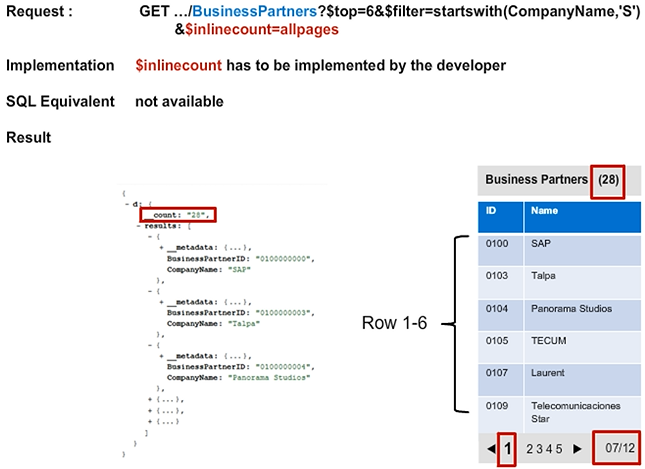
No separate call for $count is necessary. This is important because every additional call to the service causes an additional round trip between the consumer and service. This must be avoided since latency is the biggest problem for response times, especially with mobile scenarios.
Paged Results
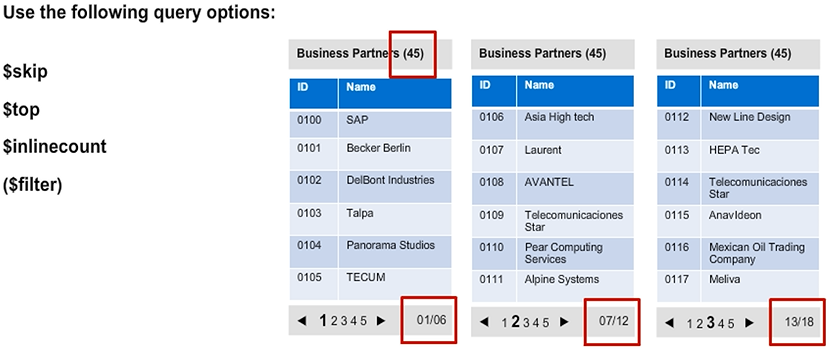
Using the query options $skip, $top, and $inlinecount, the results of a query can be displayed in several pages through which the consumer can navigate. This functionality is called client-side paging since the client forces the server to respond in a certain way.
When using client-side paging with paged results, the client controls how many values are retrieved. This could lead to problems if, for example, a client tries to retrieve a large amount of data from the backend.
It is important that the server is somehow shielded from such unintentional Denial of Service attacks. This is where server-side paging comes into play.
The service can be implemented with only a limited number of rows to be returned. There is no conflict for the usage of the client base and server-based paging since the maximum chunks of data that can be retrieved should be much larger than the screen of a mobile device.
OData Query Options — $expand
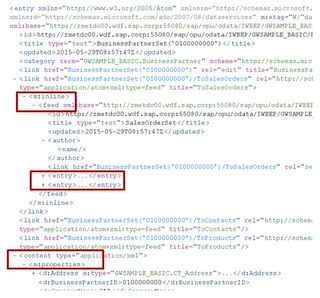
When using $expand, you follow the navigation properties of an OData service. In our example, $expand is used to either retrieve all sales orders of a business partner or all items of a sales order. Alternatively, it can be used, for example, to retrieve all sales orders (including all their items) of several business partners.
OData service requirements, in the case, include the following:
- 3 entity sets
- 2 associations
- 2 navigation properties
Use Cases for Navigation Properties
Use cases for navigation properties include the following
- Get all sales orders of a business partner
- Get all sales order items of a sales order
- Get all sales orders and all sales order items of a business partner
In the following example without $expand, two calls are needed to retrieve the data:
- First call /BusinessPartners(1)
- Second call /BusinessPartners(1)/SalesOrders
In this example with $expand, only one call is needed. This saves an additional roundtrip in the HTTP communication between client and server:
- /BusinessPartners(1)?$expand=SalesOrders
$expand Example
In principal, the calls can be as complex as possible. The developer would have to decide up to which complexity $expand is handled generically by the SAP Gateway framework.
That means that if you implemented two entities with an appropriate navigation property, and if you were able to retrieve the sales orders of a business partner by using the foreign key retrieved from the selected business partner, the framework will deliver all entries.
How is $expand handled by the framework? If the request comes from the source entity BusinessPartners, the developer has access to the source keys that contain the business partner.
Filter and expand
In OData the Filter command only works on the top level element.
In this case, we can only filter on the BusinessPartners entity.