Understanding the Draft Concept
During the optimistic lock phase, another user can start editing the active instance of the business object, that is, set an exclusive lock and create their own draft instance.
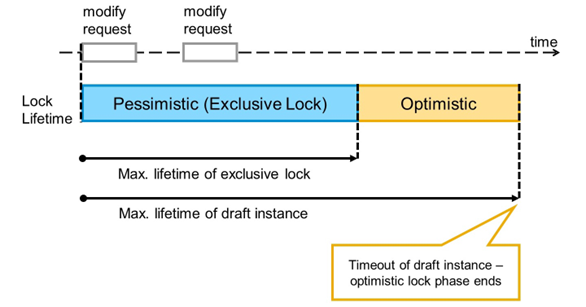
End of Optimistic Lock Phase 1 - Draft Timeout
There is a configurable maximum lifetime for drafts. If the draft is not used for a certain period of time, the draft is discarded automatically by the life-cycle service. If no other draft exists at that moment, the optimistic lock phase ends.
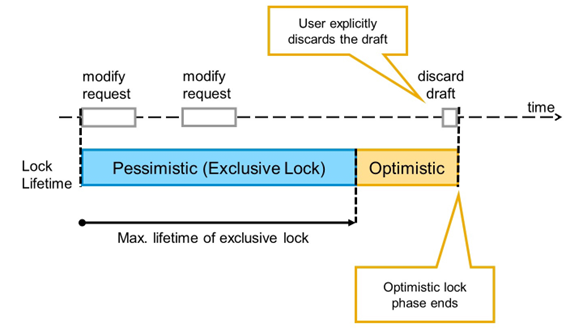
End of Optimistic Lock Phase 2 - Discard Draft
If the user that created a draft instance for an active instance discards the draft explicitly, the optimistic lock phase ends. This can be the case if the data changes are no longer relevant.
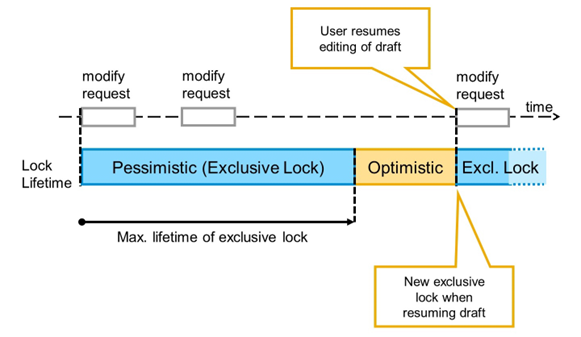
End of Optimistic Lock Phase 3 - Draft Resume
If the user that created the draft continues to work on the draft instance after the exclusive locking phase has ended, the draft can be resumed and the changes are still available for the user. The optimistic locking phase ends as a new exclusive lock is set for the corresponding active document.
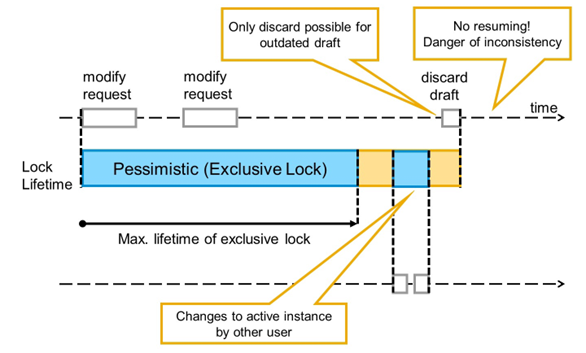
How to Avoid Resume of Outdated Draft?
During the optimistic lock phase, it is possible that another user sets an exclusive lock, creates another draft instance, and saves the changes to the active instance. If there is legacy code accessing the same data, it is even possible that the active instance is changed directly without using a draft.
This makes the original draft outdated because it does not reflect the latest changes on the active instance. If the draft is not touched until it reaches its maximum lifetime, this is not an issue.
To avoid data inconsistencies, the framework has to ensure that the owner of the draft can only discard the changes. Resuming the draft must not be possible after the active instance was changed directly or via another draft instance.
ETag Fields in Draft
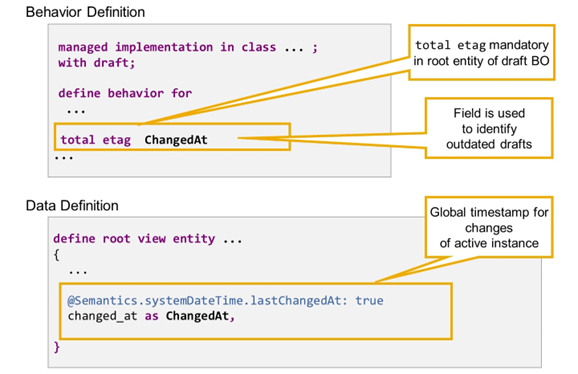
Total ETag in Draft Scenario
The RAP runtime framework uses an ETag field approach to identify outdated drafts. If the ETag field in the active instance and the draft are still the same, the draft is still valid and resuming is possible. If the value of the ETag field differs in the active instance and the draft instance, the active instance was changed since the exclusive lock expired and resuming the draft is no longer possible.
This ETag field is defined by adding total etag to the define behavior statement of the BO's root entity. The addition total etag is not supported in the behavior definition of child entities.
The field to be used as Total ETag field has to meet the following requirements:
- The Total ETag field value in the active version always changes when the active version is changed
- The Total ETag field value in a draft instance does not change during the draft lifetime
The administrative field annotated with @Semantics.systemdateTime.lastchangedAt: true, which we used as ETag master field earlier, meets these requirements.
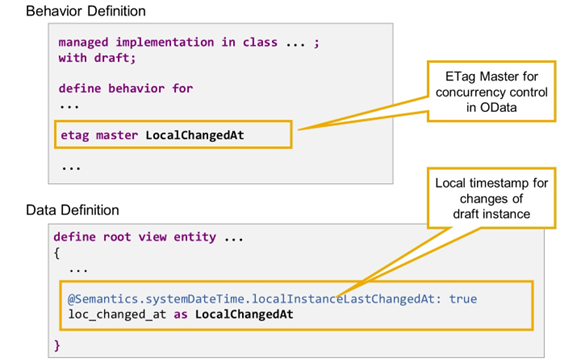
ETag Master in Draft Scenario
On the other hand, the lastChangedAt field is not suitable as ETag master anymore if the BO is draft-enabled. For optimistic concurrency control in OData to work properly, the ETag master field has to receive a new value whenever there is an update of the draft instance of the related RAP BO entity. The lastChangedAt timestamp only changes when the draft is persisted.