Understanding the Draft Concept
Draft Actions
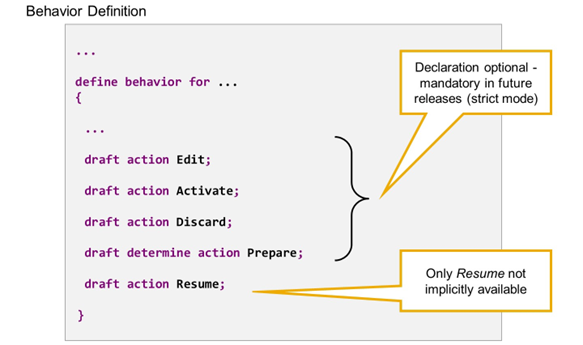
Draft Actions
Draft actions are actions that are implicitly available for draft business objects as soon as the business object is draft-enabled. They only exist for lock master entities, as they always refer to the whole lockable subtree of a business object.
All draft actions but one are automatically available in EML and exposed to OData, even without explicitly mentioning it in the behavior definition. The exception is draft action RESUME, which has to be declared in the behavior definition before it is available in OData and in EML.
The following draft actions exist:
Draft Action EDIT
The draft action EDIT copies an active instance to the draft database table. Feature and authorization control is available for the EDIT, which you can optionally define to restrict the usage of the action.
Draft Action ACTIVATE
The draft action ACTIVATE is the inverse action to EDIT. It invokes the PREPARE and a modify call containing all the changes for the active instance in case of an edit-draft, or a CREATE in case of a new-draft. Once the active instance is successfully created, the draft instance is discarded.
In contrast to the draft action Edit, the Activate action does not allow feature or authorization control. Authorization is controlled later when the active instance is saved to the database.
Draft Action DISCARD
The draft action DISCARD deletes the draft instance from the draft database table. No feature or authorization control can be implemented.
Draft Determine Action PREPARE
The draft determine action PREPARE executes the determinations and validations that are specified for it in the behavior definition. The PREPARE enables validating draft data before the transition to active data.
In the behavior definition, you must specify which determinations and validations are called during the prepare action. Only determinations and validations that are defined and implemented for the BO can be used. No validations or determinations are called if there is nothing specified for the PREPARE.
Draft Action RESUME
The draft action RESUME is executed when a user continues to work on a draft instance whose exclusive lock for the active data has already expired. It re-creates the lock for the corresponding instance on the active database table. On an SAP Fiori elements UI, it is invoked when reopening and changing a draft instance whose exclusive lock is expired.
In case of a new draft, the same feature and authorization control is executed as defined for a CREATE. In case of an edit-draft, the same feature and authorization control is executed like in an Edit.
As the RESUME action is application-specific, it is only exposed to OData if it is explicitly declared in the behavior definition. You can only execute the RESUME action via EML if the action is explicitly made available in the behavior definition.