Creating Database Procedure
Database Procedures
They are the most flexible mechanism to implement data-intensive calculations in SAP HANA, and for which SQL Script can be used.
The following are some options to define database procedures in SAP HANA:
- Typical the SQL statement ‘CREATE PROCEDURE …..’ directly in the SQL console – this is not the recommended approach.
- Use a source file with extension .hdbprocedure in the development view of the Web IDE – this is the recommended approach.
CREATE PROCEDURE <procedure name>
[(<parameter clause>)]
[LANGUAGE <lang>]
[SQL SECURITY <mode>]
[DEFAULT SCHEMA <default_schema_name>]
[READS SQL DATA]
AS
BEGIN [SEQUENTIAL EXECUTION]
<procedure body>
END;
Elements of a procedure header
The following are elements of a procedure header:
- LANGUAGE specifies which programming language the procedure is implemented in SQL Script is the default.
- SQL SECURITY specifies which user’s privileges apply when the procedure is executed. Default is DEFINER.
- DEFAULT SCHEMA specifies the database schema to be used for unqualified database object accesses within the procedure body.
- READS SQL DATA specifies that the procedure is free of side effects, i.e. does not modify data in the database. You need to remove this line if your procedure uses DDI statements such as CREATE TABLE.
- SEQUENTIAL EXECUTION forces sequential execution of the procedure logic. No parallelism takes place.

Database procedures can have several output parameters, and a mix of parameters of scalar and table types is possible.
They can also have input parameters and parameters which are both input and output. Therefore, the keywords IN, OUT and INOUT are necessary for the definition of the signature to indicate the kind of parameter. IN is the default.
Several optional clauses can be used in the procedural header. The most important one is the following:
READS SQL DATA prevents the use of constructs in the procedure body that could lead to side effects, for example, INSERT statements or dynamic SQL using EXEC. Remove this is you wish to use statements that will modify the database.
Declarative Logic in SQL Script
Using declarative logic only, which implies side-effect-free programming, has a very big advantage:
- The procedure developer defines what data to select using SELECT or CE functions.
- The database system determines how and executes accordingly
- Data selection using declarative statements can be parallelized massively.
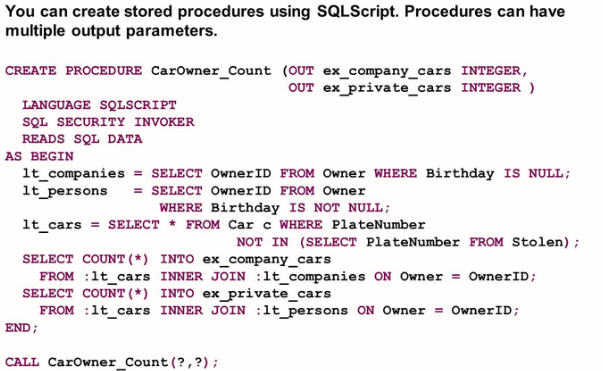
Deleting Stored procedures
DROP PROCEDURE <procedure name>Error Reporting
Procedures can have table and scalar output parameters, which can be used to return more readable error messages in case of exceptions. The figure USING SQL Errors in Exceptions
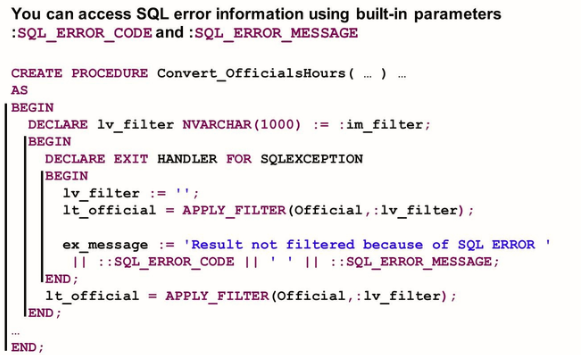
Executing Stored Procedures
To call a procedure, use the CALL statement. There are different options depending on where you call the procedure and for passing parameters, as shown in the figure Calling Procedures.
Arguments for IN parameters of table type can either be physical tables, views or table variables. The actual value passed for tabular OUT parameters must be ‘?’ when calling a procedure in the SQL Console.

Calling a procedure WITH OVERVIEW will return one result set that holds the information of which table contains the result of a table output parameter. Scalar outputs are represented as temporary tables with only one cell. When you pass existing tables to the output parameters, WITH OVERVIEW inserts the result set tuples of the procedure into the provided tables. When you pass ‘?’ to the output parameters, temporary tables holding the result sets are generated. These tables are dropped automatically when the database session is closed.
We will create a procedure but we will use the recommended approach which is to develop a source file with the extension .hdbprocedure in the development view of Web IDE.