Trapping Errors in SQLScript
Trapping Errors
In addition to the sorts of exceptionally previously described, there are circumstances in which values may meet the technical requirements of SQL Script, but can still lead to undesired or nonsensical results. In such cases, it is helpful to trap the problematic values and lead the SQL Script code to a clean exit, preferably one that informs the end-user about what problems occurred and how to avoid them in the future.
Cause of errors
- Missing parameters
- Mismatched data types
- Invalid or undesired values
- Misleading results
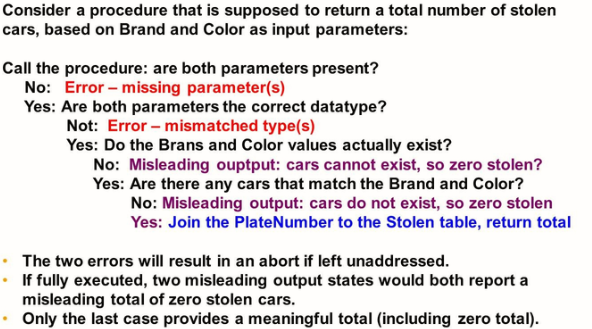
In this example, the procedure should have several possible exit points:
- The two errors should lead to messages to the user, indicating an unsuccessful execution due to bad inputs, and showing the required parameters/types.
- The first misleading output, if joined, will report zero stolen cars. However, this is misleading because the calculation is done with the nonexistent value of the brand and/or color. This branch of the logic tree should exit without joining and inform the user that the supplied brand/or color is not valid. A list of unique values may be returned to the user to show valid values.
- The second misleading output, if joined, will also report zero stolen cars. However, this is because no cars exist in the brand/color combination. Even though every value supplied is valid, it is not meant to indicate a total of zero stolen cars. This branch of the logic tree should exit without joining and inform the user no such cars exist.
- Only if the valid and existing combination of brand/color is supplied should plate number values be joined against the stolen table, and a count (*) performed.
Customizing Error Messages
- Declaring a CONDITION variable allows you to name SQL error codes or define a user-defined condition.
- Using CONDITION variables for SQL error codes makes the procedure/ function code more readable

The CONDITION declaration may be assigned to a specific error code:
System error codes act as a description of that system code.
User-defined error codes are not tied to specific error codes.
When a CONDITION has an error code assigned to it, it may be returned to the user when the CONDITION is raised. This is useful, because it allows the returned: SQL_ERROR_CODE to indicate not just that a block of code has finished executing, but the exit point at which it finished. CONDITIONS may be referenced by EXIT HANDLERS, as shown in the code fragments
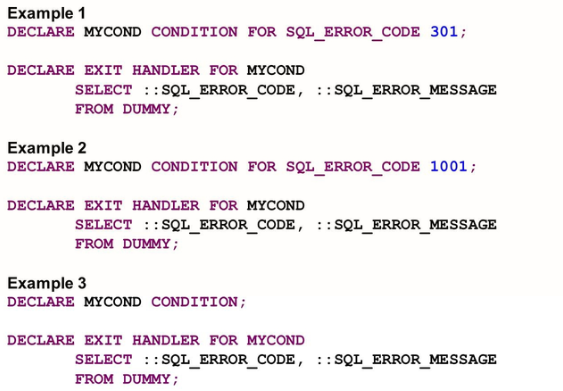
- Example 1 returns the error code (304) and associated text.
- Example 2 and 3 do not produce the error code and error messages when the procedure exits.
Raising Exceptions
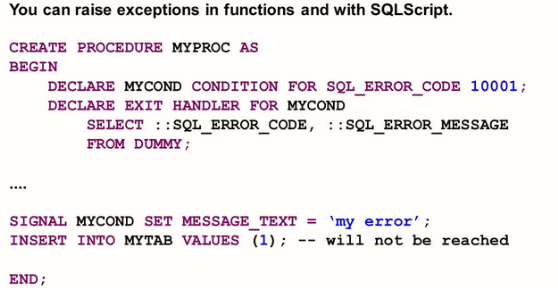
It is possible to explicitly declare an exception to be in effect with the signal command.
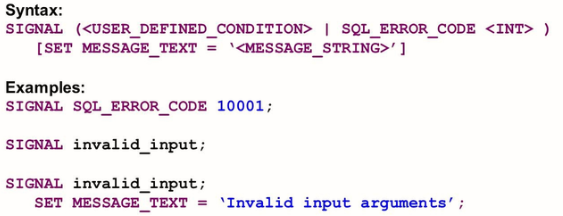
The first example assigns a custom error code to the value of: SQL_ERROR_CODE. In the second example, the execution is declared to be in the state of invalid_input, which would have been set by a DECLARE CONDITION statement; the value of: SQL_ERROR_CODE whatever value was set in the CONDITION.
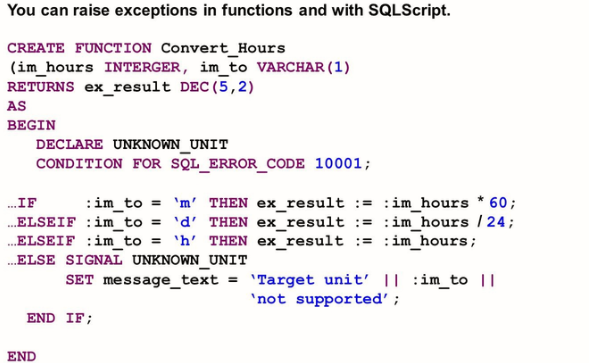
Resignal
The RESIGNAL command is similar to SIGNAL but is used exclusively in the EXIT HANDLER. As such, it does not declare an exception to be in effect. If can be used to pass along a condition name/error number, or message text.
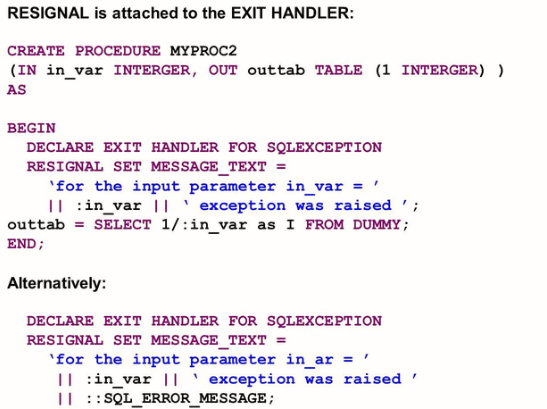
In the first example, an integer is supplied as input, and its reciprocal integer returned as output. If a zero value is supplied, a divide-by-zero will be raised and caught by the EXIT HANDLER as a SQLEXCEPTION. In this case, the RESIGNAL command is used to place customized text in the error message- the string for the input parameter in_var = is concatenated with the value of: in_var and the string exception was raised.