Describing the enhancement framework
Enhancements in the Enhancement framework
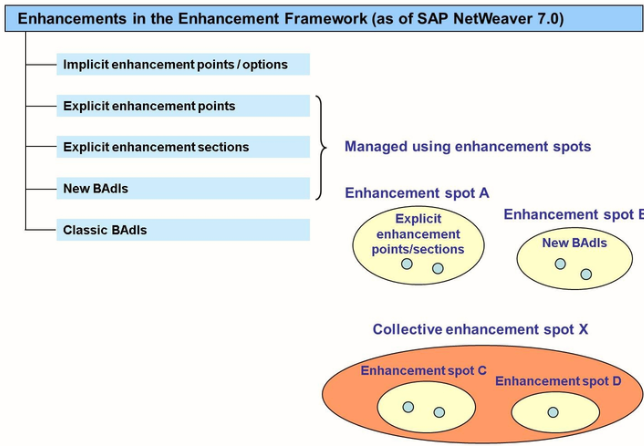
Enhancement Spot
It is possible to offer another enhancement point or section within an enhancement implementation. In implementation mode, in the context menu, choose Enhancement Operations -> Create option. Specify a point or section name and name the spot. Press ENTER and activate the new enhancement when you activate the implementation.
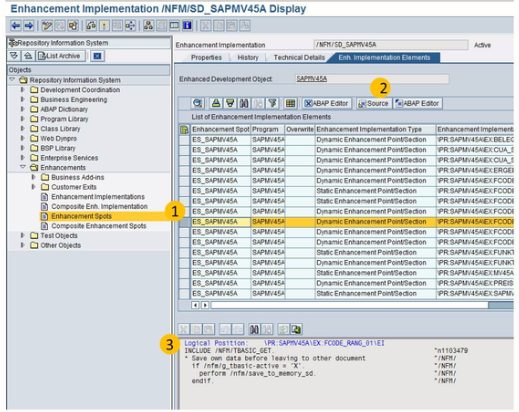
Enhancement Spot and Enhancement implementation
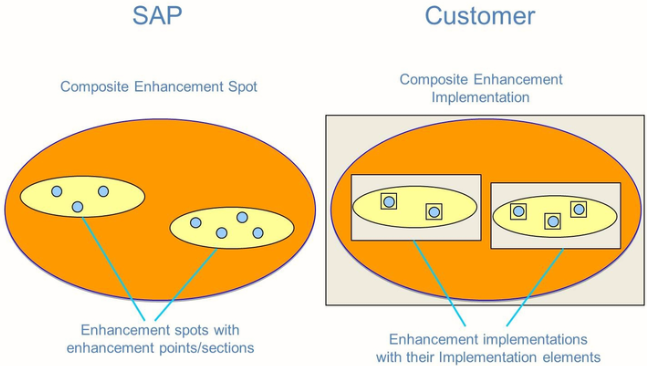
SAP offers enhancement points and section within the enhancement spots. Enhancement spots can be combined by SAP into composite enhancement spots. This combination of enhancement spots into composite enhancement spots provides a better structure of the global search of enhancement spots.
Customer can implement enhancements in the following ways:
- Customers can implement enhancement points and sections by creating enhancement implementation for the related enhancement spot.
- Customer implements all enhancement points or sections of one enhancement spot in one enhancement implementation. The enhancement elements are numbered automatically.
- Customers also have the option to combine their enhancement implementations into a composite enhancement implementation. This combination of enhancement implementations into composite enhancement implementations makes it easier to find them later.
To search for an Enhancement Spot
It is not possible to perform a global search for explicit enhancement points and sections; however, it is possible to search for enhancement spots. In general, the name of a spot that contains all explicit enhancement of a program is usually ES_<Name of the SAP program>.
Process
- Start the Tcode – SE84
- On the navigator screen, choose enhancement -> enhancement spots
- Specify the search criteria for the enhancement spots you are looking for and execute to display a list of results.
- Pick one of the results to display. You will see a list of enhancement points and sections of this spot
- On the enhancement implementation tab page, you can see all enhancement implementation of the spot. Choose the enhancement implementation that you want to display.
- The result shows all enhancement implementation elements related to the enhancement implementation name.
- Choose, for example, a dynamic enhancement implementation element and choose the source pushbutton to see the implementation code at the bottom of the screen. Choose the editor pushbutton to display the source code of the enhancement in-place in the program.