Implementing New BADI Screen Exits
Principle and Architecture of BADI Screen Exits
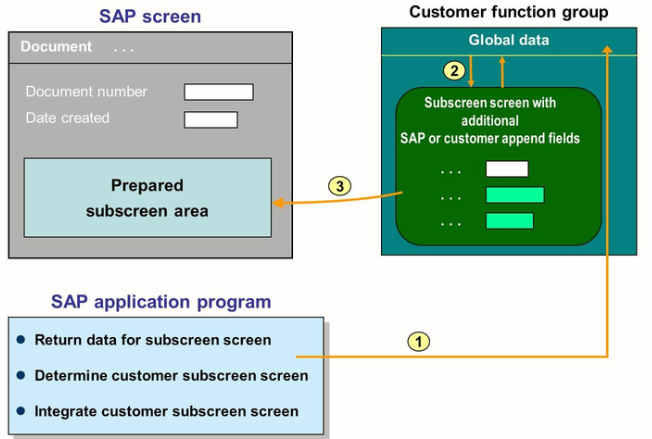
This figure shows the principle of a screen exit that SAP created using the new BADI technology. Like menu exit, there can be only one active implementation of a screen exit.
Screen exits provide customers with the option to display additional fields or other screen elements on an SAP screen, without making modifications. The SAP screen developer reserves a sub screen area to store a customer sub screen. The customer sub screen must be defined in a customer function group and it must contain the additional fields to be displayed. In the corresponding customer implementation of the BADI, the reference to the sub screen is specified and this sub screen is determined and used in the PBO (Process Before Output) of the SAP screen.
BADI Screen Exits – Architecture and Call syntax
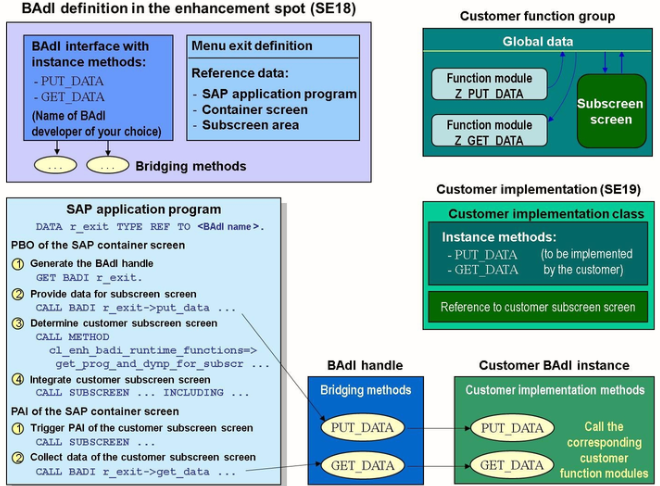
Implementation of New BADI Screen Exit
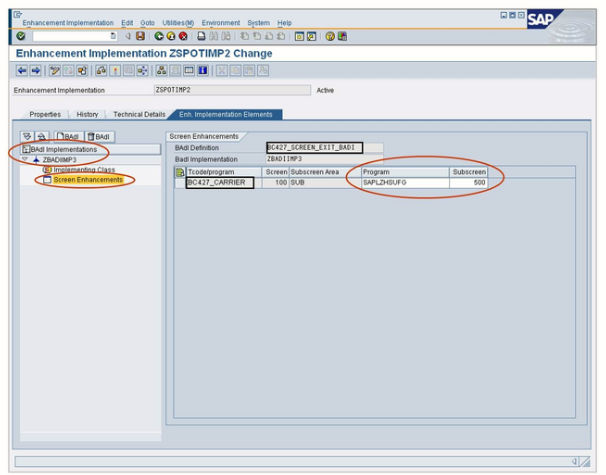
To search for and use BADI Screen Exits
- On the SAP standard screen, search for a sub screen area
- In the SAP standard program, search for the GET BADI command. You will also find the method GET_PROG_AND_DYNP_FOR_SUBSCR of class CL_ENH_BADI_RUNTIME_FUNCTIONS, which tells you that there is a BADI screen exit available.
- Double click on the reference variable used in the GET BADI statement to navigate to the definition of the reference variable
- To navigate to the enhancement spot to which the BADI belongs, double click the BADI used to the type the reference variable
- Read the BADI documentation and perform the subsequent steps for the BADI implementation
- Create the function group, including the sub screen, the TABLES structure and the corresponding function modules
- Create an implementation for the enhancement spot and for the BADI
- In the BADI, implement the available program exits
- In the BADI, double click the available screen exit to implement it
- Specify the sub screen and the main program of the function group. The name of the main program is the name of the function group with the prefix SAPL
- Activate all objects